
Linux-Operating-systems
Question 1 |
Consider the execution of the following commands in a shell on a linux operating system.
system
bash$cat alpha
Mathematics
bash$in alpha beta
bash$ rm alpha
bash$cat >> beta << SAME
Information Technology
SANE
bash$ cat beta
The output of the last command will be:
Mathematics Information Technology SAME. | |
Mathematics Information Technology. | |
Information Technology. | |
Information Technology SAME. |
Question 1 Explanation:
Note: Out of syllabus.
Question 2 |
The Linux command “mknod myfifo b 4 16”
Will create a character device if the user is root | |
Will create a named pipe FIFO if the user is root | |
Will create a block device if the user is root | |
None of the above |
Question 2 Explanation:
The mknod command makes a directory entry and corresponding inode for a special file. The first parameter is the name of the Name entry device. Select a name that is descriptive of the device. The mknod command has two forms that have different flags.
Syntax: mknod Name { b | c } Major Minor
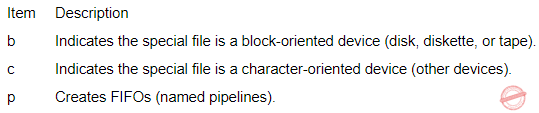
Syntax: mknod Name { b | c } Major Minor
Question 3 |
Which UNIX/Linux command is used to make all files and sub-directories in the directory “progs” executable by all users ?
chmod−R a+x progs | |
chmod−R 222 progs | |
chmod−X a+x progs
| |
chmod−X 222 progs |
Question 3 Explanation:
Here, observe 2 key points is
1. All files and their subdirectories
2. Execute by all users
Step-1: Normally any file consists of 3 categories.
1. Owner
2. Group
3. Others
Step-2: Every category is represented in 3 accesses.
1. Read(Octal value 4)
2. Write(Octal value 2)
3. Execute(Octal value 1)
Step-3: To change user permission, we are using command is chmod.
Chmod syntax: chmod permissions filename
1. All files and their subdirectories (using recursive command ‘R’)
2. Execute by all users(using ‘a+x’ subcommand. ‘a’ is nothing but all and ‘+x’ is execute permissions)
Actual command required: chmod− R a+x progs
There are 3 questions to complete.